How to eject water from Apple Watch with Water Lock
On watchOS 10 or later, press the side button (the flat one below the Digital Crown) to open Control Center, then tap the water-drop button. A small drop appears at the top of the watch face and the touchscreen stops reacting, so splashes on the glass can't open apps or answer calls. When you are out of the water, press and hold the Digital Crown until the display says Unlocked. The tones that play as it unlocks are the eject. Turn your wrist so the speaker slots, on the side of the case opposite the crown, face the floor and the water has a downhill path out. If the speaker still sounds muffled, lock and unlock again; a second or third round after a long swim is normal.
Older watchOS and older watches
Before watchOS 10 the side button opened the Dock, so Control Center sits behind a swipe instead: swipe up from the bottom of the watch face and tap the same water-drop button. Older releases also unlock by turning the Digital Crown rather than holding it, with the same tones. That matters most on Apple Watch Series 3, which stops at watchOS 8 and always uses the swipe-up, turn-the-crown method. To check your version, open Settings on the watch and go to General > About, or open the Watch app on your iPhone and tap General > About. And if the screen shows the drop icon and ignores every tap, the watch is not frozen: Water Lock is on, and the crown turns it off.
What the Apple Watch water eject sound is
The sound you hear as Water Lock switches off is how the watch vibrates water out: a run of loud, low beeps from the speaker. Each tone makes the speaker membrane travel further than a ringtone would, and that movement throws water out of the small cavity behind the speaker slots. It lasts a few seconds. With water still inside it can sound rattly or faint, which is expected, and it usually sounds cleaner on a second run. The tones clear the speaker and nothing else: they don't dry the microphone opening, the sensors on the back or a fabric band. Fog or droplets under the display glass are a different problem, because they mean water got past a seal, and that watch needs Apple rather than more tones.
When to turn Water Lock on
Switch it on before the water, not after: before the pool, the sea or the shower, before washing dishes, or before a run in heavy rain, so drops on the screen can't tap anything. Start a Pool Swim or Open Water Swim workout and Water Lock turns on automatically; at the end you unlock it with the Digital Crown, which plays the tones, before you stop the workout. Use it afterwards whenever alarms, Siri or call audio sound quieter or fuzzier than usual, the usual sign of water in the speaker. After salt water, a chlorinated pool or soapy water, rinse the watch under fresh tap water, dry it with a lint-free cloth, then run Water Lock once more to clear the rinse water.
Swimming, showers and water ratings by model
Series 2 and later and every Apple Watch SE are water resistant to 50 meters under ISO 22810:2010, which Apple describes as fine for shallow-water activities such as swimming in a pool or the ocean, but not for scuba diving, waterskiing or other high-velocity water. Every Apple Watch Ultra is rated to 100 meters and certified to EN13319, which covers recreational dives to 40 meters with a compatible dive app. The original Apple Watch and Series 1 are only splash resistant: rain and handwashing are fine, swimming is not. On any model, Apple advises against saunas and steam rooms, and while showering is allowed from Series 2 on, soap, shampoo, lotion and perfume can harm the seals and acoustic membranes. Resistance fades with knocks and age, Apple cannot reseal a watch, and leather bands are not water resistant.
Water in your iPhone or AirPods instead
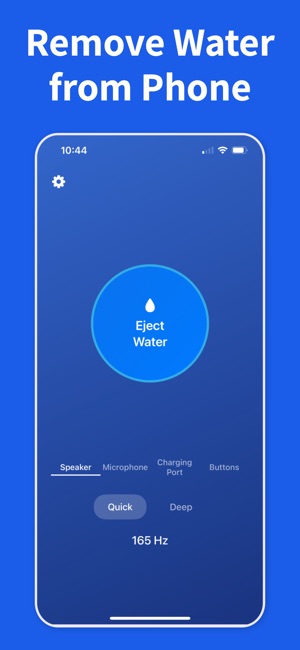
Water Remover has no watch app and does not run on Apple Watch, which needs nothing beyond Water Lock. The app is for devices without a Water Lock of their own. On iPhone it plays a low tone through the built-in speakers, 165 Hz for 5 seconds in Quick mode or a 100 to 800 Hz sweep over 15 seconds in Deep mode, to push water out from behind the grille. Its AirPods mode plays a softer tone through earbuds you have taken out of your ears and laid mesh down, with Automatic Ear Detection turned off. Neither mode dries the inside of a device; that still takes time in dry air.