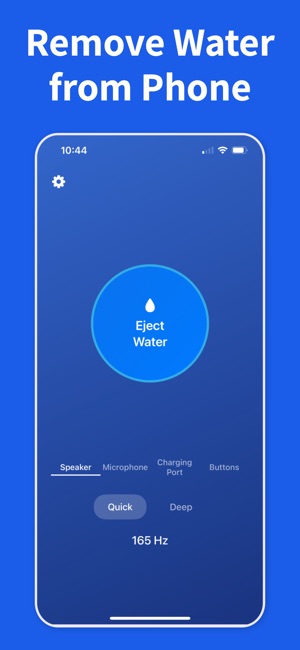
Bottom speakers, earpieces, and other small openings can hold droplets long after the outside of the phone feels dry. Begin with the opening that sounds quieter, duller, or more distorted.
02
Run one short eject cycle
Keep the phone upright, play a short water-eject cycle, and let the vibration do the work. Short repeats usually work better than one long blast.
03
Listen before you repeat
Test the same song, ringtone, or voice note between passes. Stop once the speaker sounds normal again, then let the phone finish air-drying.
Frequently asked questions
Is there a built-in water eject feature on iPhone?
No. Apple Watch ships with Water Lock, but iPhone does not include a native water-eject mode as of iOS 18. The closest options are a dedicated app like Water Remover or a user-installed water eject shortcut. Both work the same way: playing a low-frequency tone that vibrates trapped droplets out of the speaker mesh.
Do water removal apps actually work on iPhone?
Yes. The physics are straightforward — a tuned tone around 165 Hz pushes the speaker diaphragm hard enough to expel water droplets. It's the same principle Apple uses on Apple Watch. Apps like Water Remover simply automate the tone and volume so you don't have to dial it in manually. Most users hear the speaker clear up in one or two short cycles.
Is it safe to play the water eject sound through my iPhone speaker?
Yes, at normal volume. The tone stays within the speaker's designed frequency range and amplitude. Continuously running it at maximum volume for many minutes while water is still inside can stress the diaphragm, so stick to short cycles of 15–30 seconds and stop as soon as audio sounds normal again.
Which iPhone models does Water Remover support?
Water Remover runs on any iPhone running a currently supported version of iOS, including iPhone 15, iPhone 16, and iPhone 17 families, as well as older models going back several generations. The water-eject tone works through any iPhone speaker — the underlying physics don't depend on the model.
Is Water Remover free?
Yes, Water Remover is free to download from the App Store. Run the core water-eject tones without paying. Optional premium features may exist, but clearing a wet speaker doesn't require any purchase.
Clear trapped water with Water Remover
Download the iOS app, scan the QR code, and run a water-eject cycle as soon as your speaker sounds wet.